 DiffiCat
Website Migration Testing
See exactly what breaks when you migrate
Compare page existence, content, and pixels between the site you have and the site you're moving to. Free trial in your browser — nothing to install, no card needed.

The Problem
Website migrations break things
Every replatform, redesign, or domain change risks breaking pages, losing content, and introducing visual regressions.
Pages vanish
Broken redirects, missing pages, and unexpected 404s slip through manual QA and damage SEO rankings.
Content drifts
Titles, headings, and body text get altered or lost during migration. Small changes compound into big problems.
Layouts break
CSS changes, missing assets, and rendering differences create visual regressions that are hard to spot manually.
How It Works
Three steps to a verified migration
Enter two URLs, pick the pages, and read the report. Under a minute to the first result.
Enter Site A and Site B
Paste the site you're moving from and the site you're moving to — in the form above, or at app.difficat.com. Just want a screenshot? Enter one URL and hit Start.
Pick pages, then compare
DiffiCat discovers the pages from your sitemap. Choose which to test, set a page limit and a viewport width, add credentials behind the lock icon if a site is password-protected, and run.
Read the report
The report leads with the verdict and lists pages worst first. Expand any page for blame indicators naming Site A or Site B, word-level text diffs, and side-by-side screenshots.
Or jump straight in:
Features
Three checks, every breakpoint
Existence, content, and visual comparison — at whatever width your users browse at.
Existence Check
Never miss a broken page
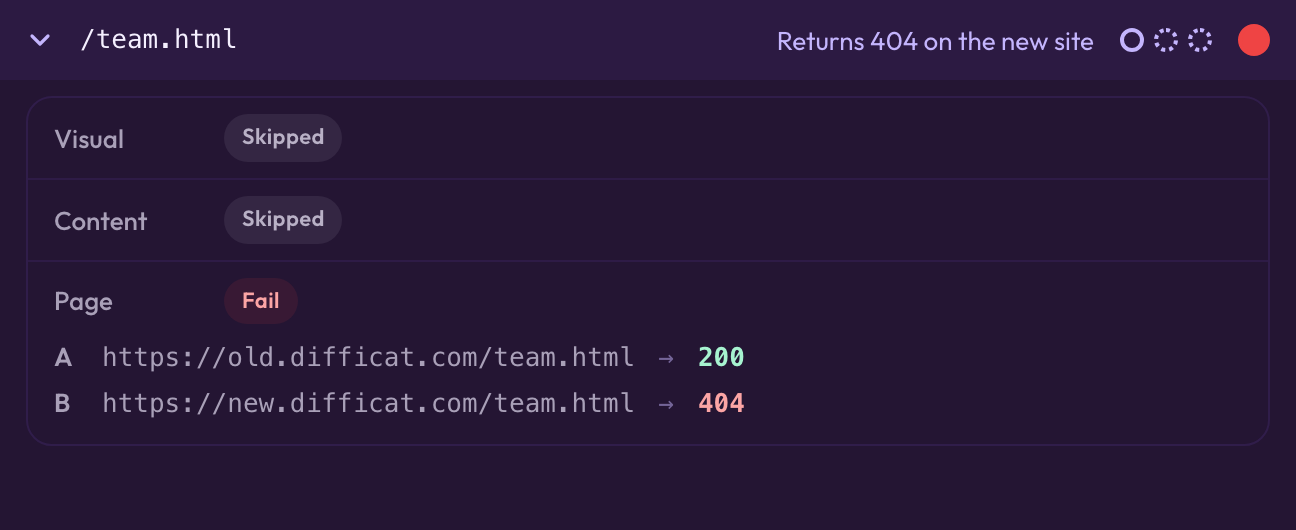
HTTP status checks across every page on Site A and Site B. Catches 404s, broken redirects, authentication walls, and server errors before your users do. Blame indicators show which site returned the error (e.g., "200 → 404") so you know exactly where the problem is.
Content Comparison
Detect every content drift
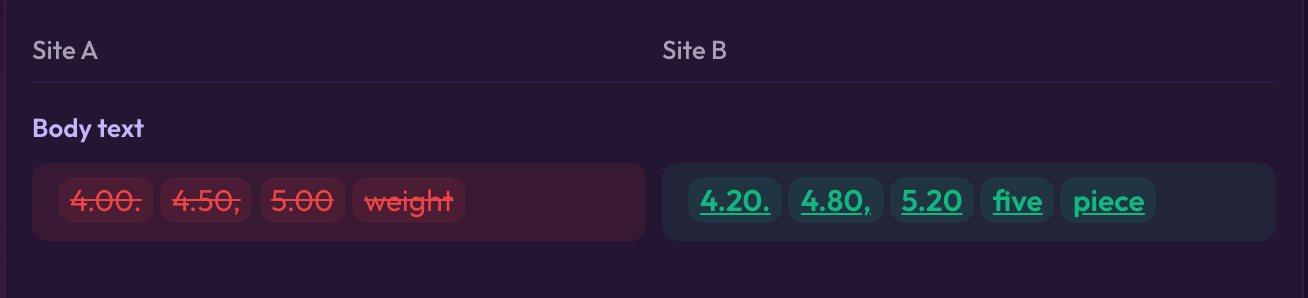
Compares titles, headings, meta descriptions, and body text with a 90% word-overlap threshold. The diff highlights the individual words added and removed, side by side under Site A and Site B, so "what changed" is a thing you can read rather than infer.
Visual Regression
Pixel-perfect visual proof
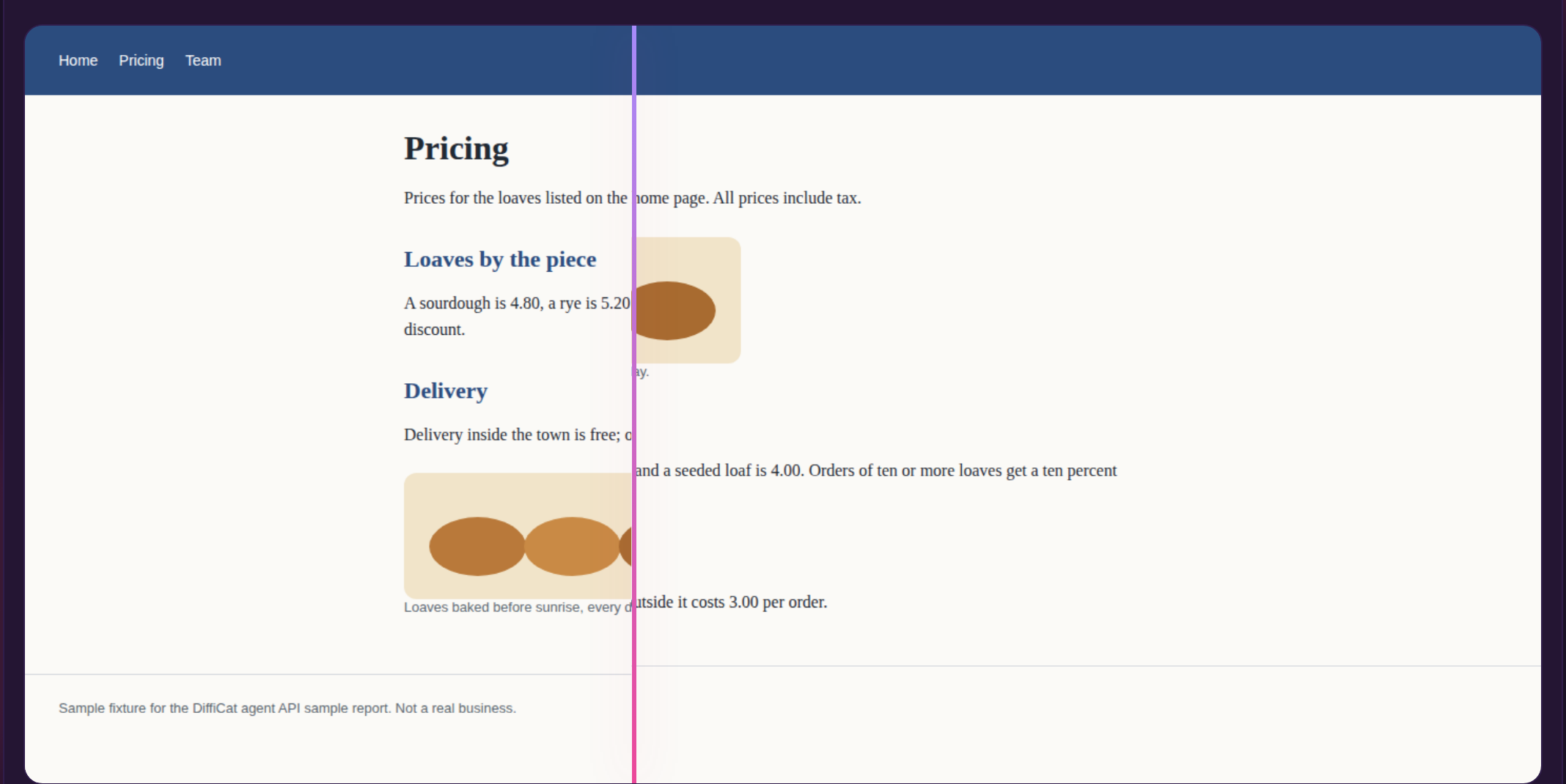
Every page captured from the top down to 10,000 px (about ten desktop screens, or Full page if you choose it in Run defaults) and compared pixel-by-pixel with a configurable threshold — 0% for strict pixel-perfect matching, slide it up to tolerate anti-aliasing. The report marks any page that was cut. Four views — changes highlighted on the new page, side by side, slider, and overlay — with synchronised scrolling, so Site A and Site B stay level as you move down the page.
Responsive capture
Every check runs at the viewport width you pick: preset chips for 375px, 768px, and 1440px, or any custom width from 320px to 2560px. A mobile breakpoint gets the same existence, text, and pixel scrutiny as the desktop one.
Snapshot site
No Site B required. Enter one address, let DiffiCat find the pages, choose which to keep and take the snapshot — credentials behind the lock icon if the site is protected. Useful for archiving a site before you touch it.
DiffiCat is a website migration testing tool that runs in your browser, with a free trial. It compares a source site against a target site — in the app these are Site A (the site you're moving from) and Site B (the site you're moving to) — across three checks: page existence (HTTP status codes and broken redirect detection), content accuracy (titles, headings, meta descriptions, and body text with a 90% word-overlap threshold), and visual regression (pixel-level screenshot comparison with a configurable diff threshold, defaulting to 0% for pixel-perfect matching). Open it at app.difficat.com with nothing to install. DiffiCat captures at any viewport width from 320 to 2560 pixels and generates a report with pass/fail breakdowns, word-level content diffs, and side-by-side screenshot viewers.
Under the Hood
Built for precision
Why DiffiCat
Website migration testing, automated
Replace hours of manual QA with automated, repeatable checks that catch what humans miss.
Manual QA
- Click through pages one by one
- Visually inspect each page for layout changes
- Compare content in spreadsheets
- Miss subtle CSS regressions and broken redirects
- Takes days for large sites
With DiffiCat
- Auto-discover pages from sitemap
- Pixel-level visual diff with threshold control
- Automated content comparison with 90% overlap detection
- Catch every 404, redirect loop, and server error
- Run hundreds of pages in minutes, at any viewport width
Pricing
Start free. Run your first comparison in a minute.
The free trial runs the full comparison engine — every check, every viewport width. Pro is there when you need more.
Start here
Free trial
$0
Try it on your own site — no card, no commitment
- 500 captured pages once when signed in, never renewed
- Up to 100 pairs a run
- Every check, every viewport width
- No account is needed to start, with 100 captured pages without one; signing in adds 500 more and unlocks Pro.
Pro
$29/month
or $290 a year (save $58) — commercial license included
- 5,000 captured pages a month included, shared by the web app and the Agent API
- Overage $0.01 a page under a $50 default cap
- Up to 10,000 pairs a run, comparisons saved until you delete them
- Cancel any time from your account page
Try it on your real migration first — upgrade only if the trial limits get in your way. After the trial you pay as you go: $0.01 per captured page from a prepaid balance you top up with $5, $10 or $25 on the account page, which also pays Agent API calls. A live comparison uses 2 captured pages per pair, a comparison against a stored snapshot 1, capturing a snapshot 1 per page, and comparing two stored snapshots is free. Free accounts’ comparisons expire after 30 days, at most 5 kept. Larger needs are quoted on request — send an enterprise enquiry. Automating from a script or an AI agent? See the Agent API, paid per call with a free daily allowance.
Use Cases
Built for every migration scenario
Platform replatforming
Migrating from WordPress to headless CMS, Shopify to custom, or any platform switch. Verify that every page, redirect, and piece of content transfers correctly.
Domain changes
Moving to a new domain or subdomain? DiffiCat verifies that all URLs resolve, redirects work, and no content is lost in the transition.
Redesigns and CSS overhauls
Catch visual regressions across your entire site after a redesign. The pixel-level diff viewer highlights exactly where layouts shifted or elements disappeared.
SEO preservation
Protect your search rankings during migration. DiffiCat checks that title tags, meta descriptions, headings, and body content are preserved on every page.
Responsive and mobile breakpoint QA
A layout that survives at 1440px can still collapse at 375px. Run the same comparison at each breakpoint and catch the regressions that only appear on a phone.
Staging sign-off before release
Compare the staging build against production before you flip the switch, and go live with a list of every page that changed instead of a hunch.
FAQ
Frequently asked questions
What is DiffiCat?
DiffiCat is a web app for website migration testing. Open app.difficat.com and it compares a source site against a target site across three checks: page existence (HTTP status codes), content accuracy (titles, headings, body text), and visual regression (pixel-level screenshot comparison). In the app the two sites are called Site A and Site B.
Is there a free trial?
Yes. Every visitor gets a free trial at app.difficat.com: 500 captured pages once when signed in (100 without signing in), never renewed, up to 100 pairs a run, with every check and viewport width, and no card needed. A live comparison uses 2 captured pages per pair, a comparison against a stored snapshot 1, capturing a snapshot 1 per page, and comparing two stored snapshots is free. After the trial you pay as you go at $0.01 per captured page from a prepaid balance (top up $5, $10 or $25 from the account page); the same balance pays Agent API calls. Abuse limits also apply: free callers get 500 comparison runs an hour and 2,000 pages a day, and every caller 200 page discoveries an hour. No account is needed to start, with 100 captured pages without one; signing in adds 500 more and unlocks Pro. Pro is $29 a month or $290 a year: 5,000 captured pages a month included, shared by the web app and the Agent API, with overage at $0.01 a page under a $50 default cap, saved comparisons (free accounts keep at most 5 for 30 days), and a commercial license; you can buy it from your account page. Larger needs are quoted on request: send an enterprise enquiry.
Do I need an account?
No account is needed to start: app.difficat.com opens straight on its three modes, with 100 captured pages without an account. Signing in adds 500 more, and it is how Pro, the commercial license, is unlocked.
How does visual comparison work, and how accurate is it?
DiffiCat screenshots both source and target URLs in a headless browser, from the top of each page down to 10,000 px (about ten desktop screens), then compares them pixel-by-pixel using the Pixelmatch algorithm. Need the whole page? Choose Full page in Run defaults, and the report always tells you when a page was cut. The default threshold is 0%, so any pixel change is flagged, and a visual diff overlay highlights exactly where it occurred. You can raise the visual sensitivity slider up to 100% to tolerate minor differences such as anti-aliasing or font rendering variations across environments.
How many pages can I compare?
As many as the site has, up to a ceiling of 10,000 per run; the free trial caps a run at 100 pairs. The page-limit control offers preset chips of 10, 20, and 50 for a quick sample, and a free-text field for any custom number. Leave the field blank and DiffiCat applies no limit, comparing every page it discovers.
Can I test mobile and tablet layouts?
Yes. Every capture runs at a viewport width you choose, with preset chips for 375px (phone), 768px (tablet), and 1440px (desktop, the default), plus a custom field accepting any width from 320px to 2560px. Run the same comparison at each breakpoint to catch layouts that survive on desktop and collapse on a phone.
What if my site requires login or authentication?
DiffiCat supports HTTP basic authentication for both source and target sites. Click the lock icon next to each URL field to enter credentials. Your session is preserved across all page requests during the comparison.
What platforms are supported?
DiffiCat runs in any modern browser at app.difficat.com — nothing to install, on macOS, Windows, Linux, or a tablet.
How does sitemap discovery work?
Automatically, unless you tell it otherwise. DiffiCat works through five strategies in order and stops at the first that returns pages: (1) a sitemap URL you supply yourself; (2) /sitemap.xml on the source site, expanding any sitemap index it finds into its child sitemaps; (3) Sitemap: lines in the source site's robots.txt; (4) /sitemap.xml on the target site, with every URL remapped back onto the source origin — this is what keeps a comparison working when only the new site publishes a sitemap; and (5) crawling the links on the source homepage. One exception: if you supply a sitemap URL yourself, that is the only strategy used — if it cannot be fetched, DiffiCat reports an error rather than quietly falling back to a crawl.
Can I take screenshots without a second site?
Yes — that's Snapshot site. Enter one address, press Find pages and choose which pages to keep, no Site B required. Give the site credentials via the lock icon if it sits behind basic auth. Handy for archiving a site before a migration, or for keeping before-shots at a specific viewport width.
How do I check for broken pages after a site migration?
Open app.difficat.com, enter your old (source) and new (target) site URLs, and run the existence check. DiffiCat automatically crawls both sites and compares HTTP status codes page by page. It flags 404 errors, broken redirects, redirect loops, authentication walls, and server errors — giving you a clear list of every broken page before your users encounter them.
How do I verify SEO is preserved after migration?
DiffiCat's content comparison checks every SEO-critical element: title tags, meta descriptions, H1-H6 headings, and body text. It compares the source and target versions of each page and flags any differences using a 90% word-overlap threshold. This catches missing meta descriptions, altered titles, removed headings, and content drift that could harm your search rankings.
Can I use DiffiCat to test single-page applications?
Yes. DiffiCat uses Playwright, a headless browser that fully renders JavaScript-driven pages before capturing screenshots and extracting content. If your SPA has a sitemap or discoverable URLs, DiffiCat can test it.
Can I compare a site on localhost or an internal network?
No. DiffiCat's servers fetch the pages, and they block localhost, loopback addresses, and private IP ranges such as 10.x, 172.16–31.x, and 192.168.x, with no override. Deploy the build to a staging URL that resolves publicly — a password-protected staging site is fine, since you can supply credentials via the lock icon.
What export formats are available?
Export produces a single ZIP containing report.txt — a plain-text summary of the run, with per-page pass/fail results and the details behind each failure — plus every screenshot DiffiCat captured, as PNG files. The text file opens anywhere and pastes cleanly into a ticket or an email; the PNGs are the screenshots DiffiCat compared for Site A and Site B. (If a run produced no screenshots, you get the text report on its own.)
Ready to verify your migration?
Start your free trial in the browser and catch what breaks before your users do. No card needed.
Start the free trialFeedback
Tell us what you think
What works for you, what's broken, what's missing? We read every message and use it to decide what to build next.