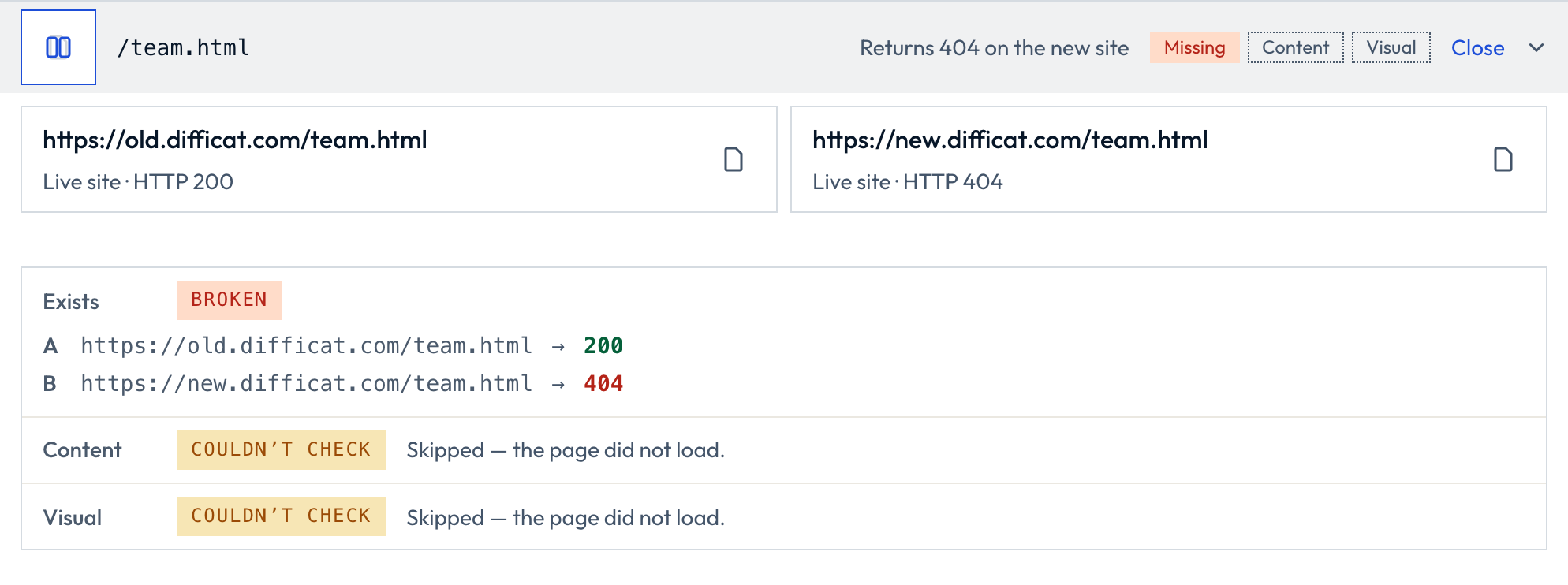
Exists
Every broken page, before your users find it
The HTTP status of every page on Site A and Site B: 404s, broken redirects, authentication walls and server errors, each naming the site that failed (200 → 404).
Website migration testing
Find every broken page, changed word and shifted pixel between the site you have and the site you're moving to.
curl https://app.difficat.com/api/v1/jobs \
  -X POST -H 'Content-Type: application/json' \
  -d '{"sourceUrl":"https://old.difficat.com",
       "targetUrl":"https://new.difficat.com","maxPages":50}'
Then
Hold GET /api/v1/jobs/{id}?wait=120 until the job ends and read /report, or pass callbackUrl for one POST when it does.
claude mcp add --transport http \
  difficat https://app.difficat.com/mcp?via=landing
Then ask your agent
“Use DiffiCat to compare old.difficat.com with new.difficat.com.”
It runs the comparison and returns a page-by-page report. Other clients
ExistenceContentVisual
old.difficat.com/pricing.html
new.difficat.com/pricing.html
Sample
Site A is old.difficat.com, Site B is new.difficat.com: two small demo sites with a few planted differences. The sheet above shows their pricing page.
1 page is missing on Site B
1 of 3 pages is missing on Site B; text differs on 1, 1 of them also looks different; 1 match.
| Page | Finding | Result |
|---|---|---|
| /team.html | Exists: returns 404 on the new site (A: 200 → B: 404) | Broken |
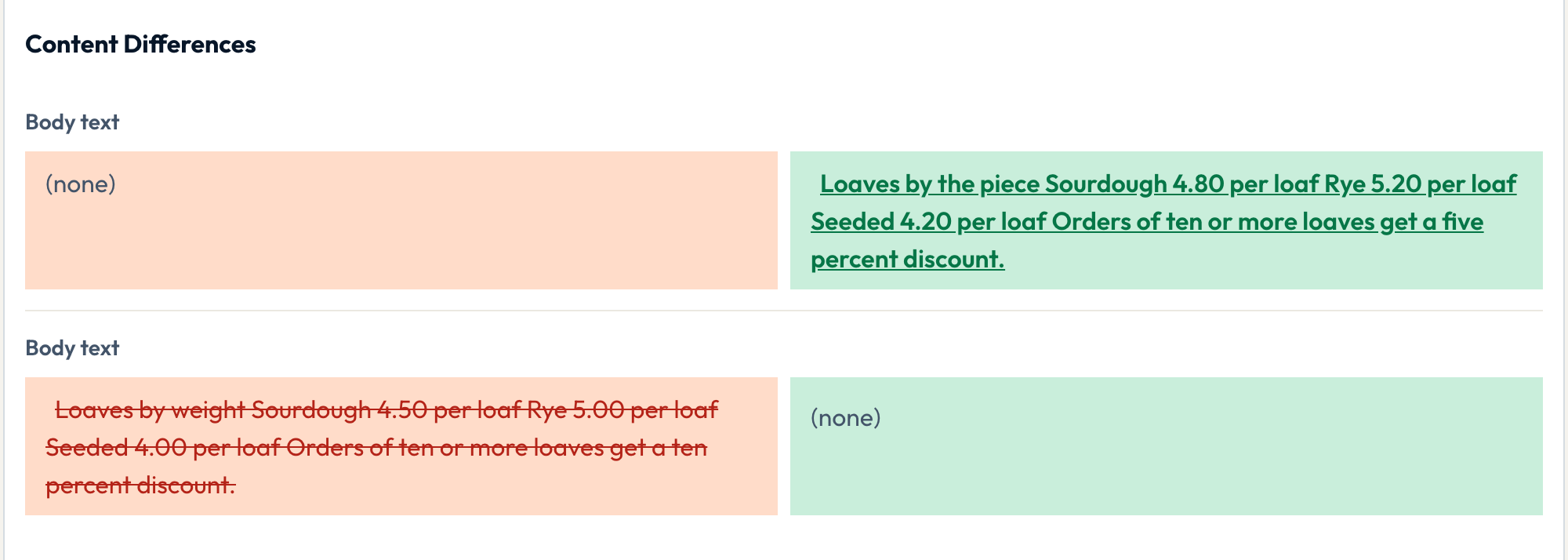
| /pricing.html | Content: 86% of words in common. Visual: 20% of the page looks different, the price list and the picture | Changed |
| / | Exists, content and visual all match | Matched |
Opens the web app with Site A and Site B filled in.
Snapshot
On launch day the old site goes offline, and with it your only record of what every page said and looked like. Take a snapshot first: one address, no Site B needed.
Covered by the free trial, one captured page per page. Sign in to keep the snapshot.
Use cases
WordPress to headless, Shopify to custom, any platform switch: confirm every page, redirect and piece of content made it across. Guides: moving to Shopify, WordPress to Webflow, Drupal to WordPress.
Moving to a new domain? Confirm every URL resolves, every redirect lands and no content is lost.
See exactly where layouts shifted or elements disappeared, page by page.
Keep your rankings: the title, H1, meta description, canonical, robots meta, hreflang and body text are checked on every page. See how to check SEO after a migration.
A layout that holds at 1440px can still collapse at 375px. Compare at each breakpoint.
Compare staging or a preview against production and go live with a list of every page that changed, not a hunch. The same check can run on every deploy: see how to check every deploy against production.
Checks
Against a live site or a snapshot you took earlier, at whatever width your users browse at.
Exists
The HTTP status of every page on Site A and Site B: 404s, broken redirects, authentication walls and server errors, each naming the site that failed (200 → 404).
Content
The title, H1, meta description, canonical, robots meta, hreflang and body text, with a 90% word-overlap threshold. Added and removed words are highlighted side by side.
Visual
Each page from the top down to 10,000 px, or the full page, compared pixel by pixel. Changed areas are boxed and numbered in four views: side by side, slider, flip and overlay, scrolling in sync.
Viewport
Presets for 375, 768 and 1440px, or any width from 320 to 2560px, with all three checks.
Project
Snapshots, collections and compares stay together, and Run against… repeats the same baseline on staging after every fix.
How it works
Enter two URLs, pick the pages, read the report. Testing by hand? Follow the website migration testing checklist.
The site you're moving from and the site you're moving to. Either side can be a snapshot. Only saving a site for later? Choose Snapshot and enter one URL.
DiffiCat finds the pages from your sitemap, robots.txt or a crawl. Choose which to test, the page limit and the viewport width, add credentials for either site behind the lock icon if needed, and run.
Results appear page by page as the run goes, each naming the site that changed, with word-level diffs and side-by-side screenshots. Sort worst first, and keep the run in your project.
Pricing
The free trial runs the full engine: every check, every viewport width. Pro is there when you need more.
Start here
$0
No card, no commitment
$29/month
or $290 a year (save $58), commercial license included
A live comparison costs $0.02 a pair, one against a snapshot $0.01, a 200-page snapshot $2.00, and comparing two stored snapshots is free. Larger needs are quoted on request: send an enterprise enquiry. Automating from a script or an AI agent? See the Agent API.
FAQ
A web app for website migration testing. Open app.difficat.com in any modern browser, on macOS, Windows, Linux or a tablet, and compare a source site against a target site, called Site A and Site B in the app, with three checks: page existence (HTTP status codes), content (title, H1, meta description, canonical, robots meta, hreflang and body text) and visual regression (pixel-level screenshot comparison).
Yes: 500 captured pages in total when you sign in, up to 100 pairs a run, with every check and viewport width and no card needed. A live comparison uses 2 captured pages per pair, a comparison against a snapshot 1, a snapshot 1 per page, and comparing two stored snapshots is free. No account is needed to start: 100 captured pages without one, enough for a live comparison of 50 pages. Signing in adds 500 more and unlocks Pro.
Pay as you go at $0.01 per captured page from a prepaid balance you top up with $5, $10 or $25 on your account page; the same balance pays Agent API calls. Or choose Pro at $29 a month or $290 a year: 5,000 captured pages a month shared by the web app and the Agent API, then $0.01 a page up to a spending cap you set, comparisons saved until you delete them (without Pro, your five latest are kept for 30 days) and a commercial license. Larger needs are quoted on request: send an enterprise enquiry.
No account is needed to start: app.difficat.com opens straight on the compare form, with 100 captured pages without an account. Signing in adds 500 more, and it is how Pro, the commercial license, is unlocked.
Enter your old and new site at app.difficat.com and run the comparison. DiffiCat checks the HTTP status of every page on both sites and lists every 404, broken redirect, redirect loop, authentication wall and server error, so you can fix them before your users find them.
The content check compares every SEO-critical field on each page: the title, H1, meta description, canonical, robots meta, hreflang and body text, with a 90% word-overlap threshold for the body. It catches a missing meta description, a changed title, a canonical still pointing at the old site and a stray noindex before they cost you rankings.
DiffiCat screenshots each page on both sites in a real browser, from the top down to 10,000 px (about ten desktop screens), or the whole page if you choose Full page in Run defaults, and compares them pixel by pixel with Pixelmatch. The default threshold is 0%, so every changed pixel counts, and numbered boxes show where. Raise it up to 100% to tolerate anti-aliasing or font rendering.
Click the lock icon next to either URL. Server password covers HTTP basic authentication (htaccess). Sign-in page fills a site's sign-in form, such as a WordPress login: DiffiCat signs in before Find pages and again for the run, and skips logout links. It works with username-and-password sign-ins; for a code (MFA), a CAPTCHA or single sign-on, compare a staging copy with them switched off. Use a view-only account, since DiffiCat opens every page. The login is used only for that run.
Every page the site has, up to 10,000 a run; the free trial runs up to 100 pairs at a time. Pick 10, 20 or 50 for a quick sample, type any number, or leave the field blank to compare every page DiffiCat finds.
Yes. Choose 375px (phone), 768px (tablet) or 1440px (desktop, the default), or any width from 320 to 2560px, and run the same comparison at each breakpoint.
Automatically. DiffiCat tries five strategies in order and uses the first that returns pages: (1) a sitemap URL you supply; (2) /sitemap.xml on the source site, including sitemap indexes; (3) Sitemap: lines in its robots.txt; (4) /sitemap.xml on the target site, remapped onto the source, so a comparison works even when only the new site has a sitemap; (5) the links on the source homepage. A sitemap URL you supply is used on its own, and DiffiCat tells you if it cannot be fetched.
Yes, with Snapshot. Enter one address, press Find pages and choose the pages to keep, with credentials behind the lock icon if the site is protected. Each page is saved with its screenshot, text and status. Later, use a snapshot as Site A or Site B, or run the whole collection against a new host: ideal for keeping the old site before you migrate.
A project is a folder for one migration, such as “Update to V14”, visible only to you. It holds collections, snapshots and the compares between them. A collection is a named group of snapshots: every snapshot and every kept run starts one, and you can rename, star and reorganise it. Run against… compares every snapshot in a collection with the same path on another host and keeps the result in the project, so you can repeat it after each fix. A signed-in account holds up to 50 projects, 500 on Pro.
Yes. DiffiCat renders every page in a real browser (Playwright), JavaScript included, before it captures and compares. If your app has a sitemap or linked URLs, DiffiCat can test it.
DiffiCat compares sites its servers can reach on the public internet, so localhost, loopback addresses and private ranges such as 10.x, 172.16–31.x and 192.168.x are out of reach. Deploy the build to a public staging URL: a password-protected one works, with credentials behind the lock icon.
One ZIP: report.txt, a plain-text summary with every page's result and the details behind each failure, ready to paste into a ticket; report.csv, one row per page; manifest.json, every file with its SHA-256 checksum; and every screenshot as a PNG.
DiffiCat is a website migration testing tool that runs in your browser at app.difficat.com, with a free trial. It compares a source site (Site A, the site you're moving from) against a target site (Site B, the site you're moving to) with three checks: page existence (HTTP status codes and broken redirects), content (title, H1, meta description, canonical, robots meta, hreflang and body text, 90% word overlap) and visual regression (pixel-level screenshots, 0% threshold by default), at any width from 320 to 2560 pixels.
Start your free trial in the browser and catch what breaks before your users do. No card needed.
Start the free trialFeedback
What works for you, what's broken, what's missing? We read every message and use it to decide what to build next.